
Updated
Time Blocking, Step by Step
An open calendar defaults to whoever asks for your time loudest. Time blocking flips that — you decide where your hours go before the day decides for you.
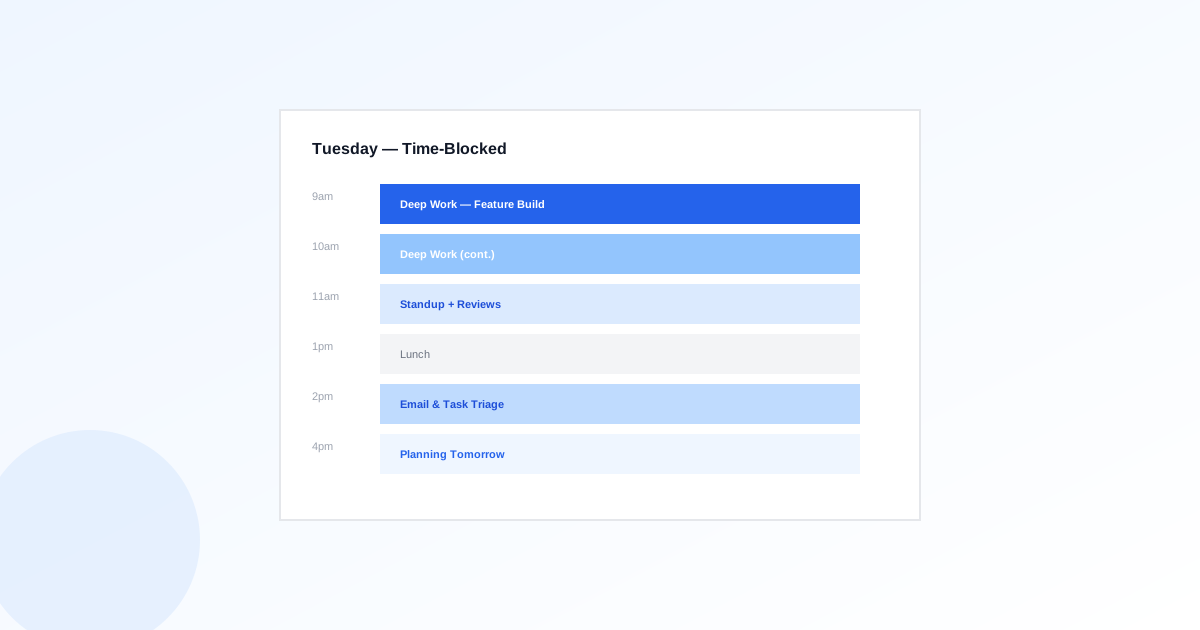
Building Your First Time-Blocked Week
List your tasks for the week, then estimate duration
Before blocking anything, know what needs to happen. Pull tasks from your board and give each a rough duration — even a wrong estimate is more useful than no estimate, since it forces you to think about scope before the week starts.
Block your deepest work first, not your meetings
Most people schedule around meetings and squeeze focus work into whatever's left — which guarantees it gets the worst hours. Block your highest-leverage work in your best hours first, then let meetings fill the remaining slots.
Batch shallow work into one or two windows
Email, Slack, and quick approvals don't need to be scattered across the day. Batch them into one or two fixed windows so the rest of your day stays free of the context-switching cost of checking a inbox every twenty minutes.
Add buffer blocks, not just work blocks
A calendar with zero slack breaks the first time a task runs long. Leave 15-30 minute buffers between blocks — they absorb overruns without cascading into the rest of your day.
Review and re-block at the end of each day
Plans drift. Spend five minutes each evening moving unfinished blocks to tomorrow and adjusting for what actually happened — a time-blocked calendar that's never revised stops being useful within a week.
Time Blocking Checklist
Turn Your Board Into Your Blocks
Pull due dates and estimated effort straight from My First Task's task view into your weekly plan.
Put this workflow into practice
Choose work that fits the time available and revisit the plan when commitments change.
Weekly Task Review Checklist: Plan a Realistic Next Week
A weekly task review reconciles your commitments with current reality. Gather loose requests, review unfinished and overdue work, check the next week's calendar, and choose a small set of outcomes that fits your availability.
ExploreFocus Sessions and Time Blocks That Fit Your Day
A focus session protects time for one defined task, while a time block reserves that period in the calendar. Plan breaks and routine obligations first so the protected work fits into the available day.
ExploreRecurring Task Checklist: Daily, Weekly and Monthly Examples
A recurring task checklist describes a repeatable obligation, its owner, schedule and completion evidence. Separate the recurrence rule from the steps inside each occurrence, and decide what happens when a run is missed or blocked.
Explore