
Updated
Choosing Project Management Software
Every tool's marketing page looks similar. Here's a concrete framework for evaluating what actually matters once your team is using it every day.
Six Questions to Ask Any Tool
Can a new team be running a board in under 10 minutes, or does it require a consultant?
Is pricing per-user and predictable, or does it require a custom quote past a certain team size?
Can you build hand-off rules without code, or is that gated behind an enterprise tier?
Does it show cycle time and workload out of the box, or only after connecting a separate BI tool?
Can a non-technical teammate use it without training, or does it assume PM-specific vocabulary?
Can you import an existing backlog from a spreadsheet or another tool in one step?
General-Purpose Suites vs. Focused Task Managers
Broadly, tools in this space fall into two camps. Neither is universally better — it depends on whether you want one tool to do everything, or a fast, dedicated home just for tasks.
| Aspect | General-Purpose Suite | Focused My First Task |
|---|---|---|
| Feature surface | Broad — docs, wikis, time tracking, forms, often bundled together | Narrower — built specifically around tasks, boards, and hand-offs |
| Setup complexity | Often requires configuration decisions before the first task is created | Usually board-ready within minutes of signup |
| Pricing | Frequently tiered with features gated behind higher plans | Typically simpler — a generous free tier, one paid step up |
| Best for | Teams that want one tool for tasks, docs, and planning together | Teams that already have docs/chat elsewhere and just need tasks to flow well |
Before You Commit, Check For
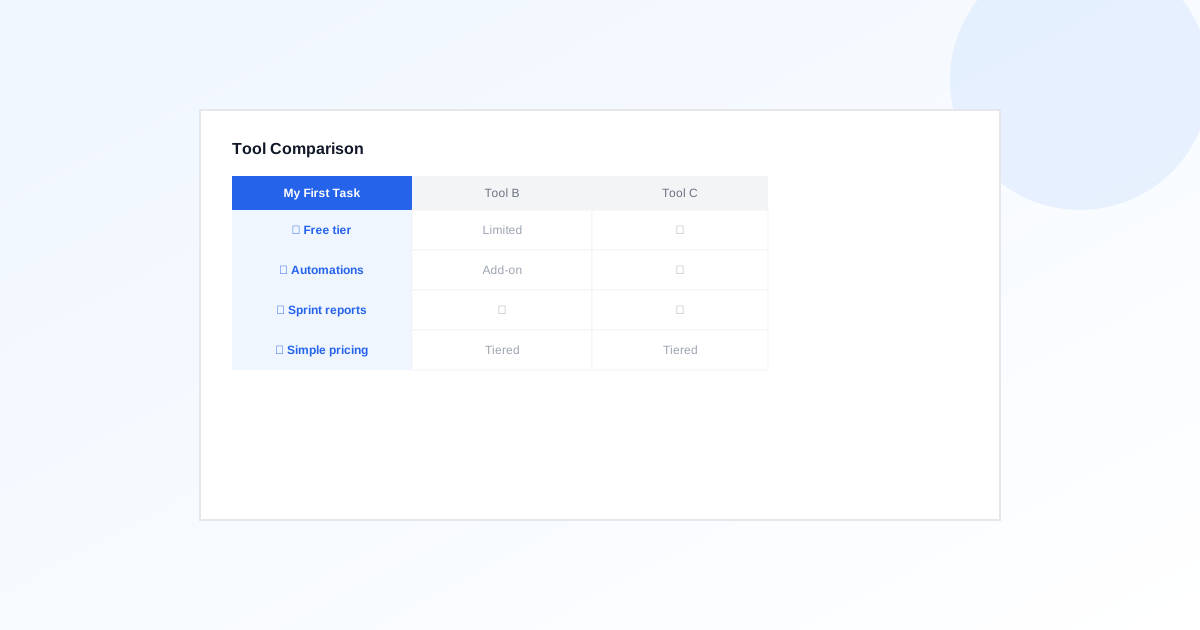
See How My First Task Scores
Free plan available, board-ready in minutes, automations and reporting included — not gated behind an enterprise tier.
Put this workflow into practice
Define the workflow you need before comparing product names or feature counts.
Task Management vs. Project Management: Choosing the Right Level
Task management organizes individual pieces of work and their next actions. Project management coordinates a set of tasks toward a defined outcome with scope, dependencies, resources and delivery decisions.
ExploreHow to Write a Project Brief With Measurable Scope
A project brief defines why the work matters, what will be delivered, who is accountable and how completion will be judged. It creates a reviewable starting agreement before detailed planning begins.
ExploreTeam Workload Management: Capacity, Ownership and Overdue Work
Workload management compares commitments with available capacity, makes ownership clear and adjusts scope before overload turns into missed deadlines. It needs context about effort, dependencies and availability, not just task counts.
Explore